One Command From Docker Compose to Kubernetes, Data Included
On this page
Every “move it to Kubernetes” guide has the same shape. Translate the compose file. Write the manifests. Apply them. Admire the pods. Then, in a paragraph near the end that starts with “of course”, the data: dump it, copy it somewhere, get a shell inside the cluster, and restore it, by hand, at two in the morning, with the old system still taking writes.
That paragraph is the migration. The rest is typing.
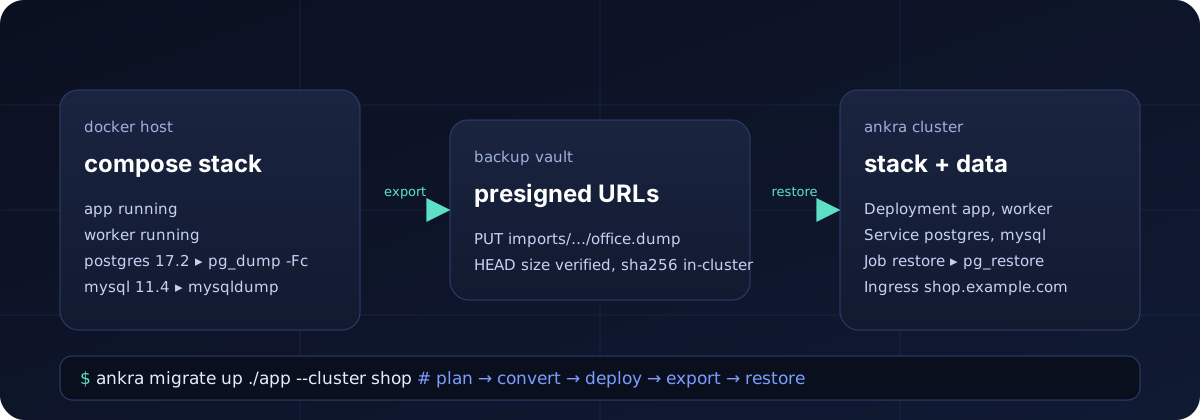
We shipped the typing part of ankra migrate a few weeks ago: point it at a directory with a docker-compose.yml, get back a stack Ankra can deploy. Today’s release is the paragraph. ankra migrate up takes the deployment from a Docker host to a cluster Ankra runs, databases and all, in one command that you can run twice: once to rehearse, once to switch.
What one command has to promise
Collapsing five steps into one is easy. Collapsing them honestly is the work, because a single command that hides a judgement call is worse than five that expose it. So we wrote down what the command has to promise before we wrote the command.
It must not touch anything until it has looked at everything. The cluster, the stack name, the backup vault, the running database containers, how much data they hold, how much disk the dumps need, and what the deployment keeps that a database dump does not carry. If any of that is wrong, the right time to find out is before the first file is written, not after a forty minute dump.
It must be safe to run again. A migration you can only run once is a migration you cannot rehearse, and a migration you cannot rehearse is a bet.
It must carry the data the way a careful operator would: consistently, verified, without a database password ever appearing on a command line, and without the platform in the middle ever holding a byte of it.
And it must say, plainly, what it did not do. A cache that was not migrated is a fact the on-call engineer needs at three in the morning, not a surprise.
Read the plan before you trust the tool
The command starts by planning, and --plan makes it stop there:
ankra migrate up ./shop --cluster prod --planMigration plan for ./shop (docker module) cluster prod stack shop (new), namespace shop output /home/mark/shop/ankra-migration data db: postgres 17.2 as shop - shop (1.8 GiB), analytics (212.0 MiB) data cache-db: mysql 11.4.2-MariaDB as root - sessions (96.0 MiB) disk about 2.1 GiB to dump, 118.4 GiB free at /home/mark/shop/ankra-migration not carried: - uploads keeps files in /var/www/uploads; volumes are not carried by this export - copy them into the cluster's PersistentVolumeClaim yourself - cache runs a Redis dataset (redis), which this export does not dump warnings: - db: the maintenance database postgres was not dumped; pass --option databases.db=postgres if the application keeps data in itPlan only; nothing was changed. Run again without --plan to migrate.Everything on that screen came from asking, not guessing. The databases and their sizes are what the servers themselves report, read from inside the running containers. The credentials are the ones the container was actually started with, so a ${DB_USER} your compose file could not resolve, a value in an env_file, or a password handed over as POSTGRES_PASSWORD_FILE all work, because the export reads the container’s environment rather than the file’s intentions. The stack line says whether shop already exists on prod, so you know whether you are creating or updating. The disk line compares what the dumps need with what is free where they will land, and refuses if it does not fit.
The two sections at the bottom are the ones we argued about longest. The not carried list is the command admitting the edges of what it does: a database dump does not move an uploads directory, and it does not move Redis. We could have left those out and let people find them. Instead the plan names every workload with a writable volume and every image it recognises as a data store it does not dump. The warning about the postgres maintenance database exists because the official image’s default configuration keeps the application’s data in exactly that database, and a tool that silently skipped it would export nothing and report success.
Then it runs
Without --plan, the same command confirms once and does the whole journey:
Migrate ./shop into cluster prod as stack shop and carry its data over? [y/N] y
==> Converting ./shopWrote 9 file(s) to /home/mark/shop/ankra-migration/stack
==> Deploying stack shop to cluster prodStack applied to cluster prod; the agent is deploying it.
==> Waiting for db, cache-db to run in namespace shop  db: no pod yet  cache-db: no pod yet  db: Pending 0/1  cache-db: running  db: running
==> Exporting the data of ./shopdb: dumping roles and globalsdb: dumping database shopdb: dumping database analyticscache-db: dumping database sessionsExported 2 database server(s) to /home/mark/shop/ankra-migration/data
==> Restoring into cluster prodRegistering the import for cluster prodUploading db/globals.sql (4.2 KiB)Uploading db/shop.dump (412.7 MiB)Uploading db/analytics.dump (58.1 MiB)Uploading cache-db/sessions.sql (31.0 MiB)Verifying the uploadRestoring 2 database server(s) into cluster prod  db: running  cache-db: running  cache-db: success  db: success
./shop is running on cluster prod as stack shop (namespace shop).Data: 2 database server(s) restored (import 6f1c8e2a-...).Reachable at: https://shop.example.com - point the DNS records at the cluster's ingress.This was a rehearsal: the source kept running. When you are ready to switch, run the same command with --stop-source for the final sync.
A few things in that transcript are deliberate.
The stack is applied under the cluster’s own name, so up updates the cluster you pointed it at rather than inventing a new one. Then it waits for the database pods to be running before it exports anything, and the restore job inside the cluster waits again for the server to accept connections before sending the first statement, because a stack applied ninety seconds ago has a database that is still initialising its data directory, and racing it is how a migration fails for a reason that fixes itself a minute later.
The export runs inside each container through its own shell, so the password comes from the container’s environment and never crosses the host as an argument. PostgreSQL is dumped as pg_dump -Fc per database plus roles and globals. MySQL and MariaDB are dumped with mysqldump --databases, as root when the image has a root password and as the application user when it does not, which is what a MYSQL_RANDOM_ROOT_PASSWORD server leaves you with.
The upload goes straight from your machine to the organisation’s backup vault on presigned URLs the platform minted for exactly those objects. Ankra verifies every object arrived at the size the export recorded, then hands the cluster’s agent presigned download URLs and nothing else: no vault credential reaches the cluster, and no dump passes through the platform. Inside the cluster the agent runs a Job that downloads each artifact, checks its checksum against the manifest, and restores with the engine’s own tools against the Service and Secret the conversion generated, roles first, then each database. The deployment engine that applies the stack is the same one tracking the restore job, so ankra migrate restore-status can tell you where it is if you walked away.
Rehearse, then cut over
The last line of the transcript is the point of the whole design. Nothing about that run touched the source. Your compose stack kept serving traffic through all of it. What you have at the end is a complete, working copy of production on the cluster, restored from a consistent point-in-time dump, and you can test it as hard as you like: run your integration suite against it, click through it, check the row counts.
When it looks right, the cutover is the same command with one flag:
ankra migrate up ./shop --cluster prod --stop-source --yes--stop-source stops every service in the compose project that is not a database, right before the export, so nothing writes to the source after the dump begins. The databases keep running because the dump needs them. The stack on the cluster is re-applied (a no-op if nothing changed), the pods are confirmed running, the data is dumped once more and restored over the rehearsal copy, and the summary ends with the command that starts the source’s services again, in case you need to go back. Then you move the DNS record. The window in which the application is unavailable is the length of the final dump and restore, which for most compose stacks is minutes.
If your data is measured in hundreds of gigabytes, the plan will have told you so, and you will want to look at a different approach to PostgreSQL on Kubernetes than a dump and a restore. For the stacks this command is built for, the small and medium deployments that have been living on one VM for years, it is exactly enough.
What it will not pretend to do
The honest list, because it is the list that makes the rest trustworthy.
Files in volumes are not carried. Uploads directories, generated assets, anything a non-database workload keeps in a named volume: the plan names each one and the summary repeats it, and you copy those into the cluster’s PersistentVolumeClaim yourself.
Data stores the export does not know how to dump, such as Redis, MongoDB, search indexes and queues, are named in the plan and left where they are. For a cache that is usually the right answer anyway.
A single dump above 5 GiB cannot be uploaded in one piece yet, and the plan says so before the dump runs rather than after.
PostgreSQL roles come across without their passwords. That is deliberate: a globals dump that re-set the password of the very user the restore connects as would lock the cluster out of its own database, restore included. The application user keeps the password from the cluster’s Secret, and the export warns you which other login roles need one set afterwards.
None of that is hidden in a footnote. It is on the screen before you say yes.
Try it
You need the Ankra CLI, a cluster in your organisation, and a backup vault (ankra backup vaults provision creates one; when the organisation has exactly one, the command picks it). Then, from the directory with your compose file:
ankra migrate up . --cluster <your-cluster> --plan # look firstankra migrate up . --cluster <your-cluster> # rehearseankra migrate up . --cluster <your-cluster> --stop-source --yes # switchThe separate verbs are still there when you want to inspect each step: ankra migrate convert writes the stack, ankra cluster apply deploys it, ankra migrate export dumps, ankra migrate restore loads, and ankra migrate data does the last two together. up is those, in order, with the checks between them written down so you do not have to remember them at two in the morning.
Get started: Create a free account on Ankra and provision your first cluster inside the free 30 vCPU allowance.
Join our community: Slack
Follow us on: LinkedIn | GitHub
Contact us: hello@ankra.ai
Get the next post in your inbox
Related Posts
Using Cursor with the Ankra CLI as an Infrastructure Subagent
Cursor is good at application code but loses context the moment a change crosses into Kubernetes, Helm, and CD pipelines. Adding the Ankra CLI as an infrastructure subagent gives it cluster-aware grounding so developers and platform teams can work on the same artifacts.
One Prompt to a Live URL: The Anatomy of an Agent-Shipped Product
We gave an AI agent one paragraph: build an animated deep sea facts page, wire it to our private GPU, ship it. It came back with a live URL. Here is how.